If you've been working with SAP's modern development stack, you already know that ABAP OData V4 services are the backbone of every serious Fiori application and external integration built today. OData V4 isn't just an incremental upgrade from V2 — it's a fundamentally different programming model, and if you approach it the same way you did V2, you'll hit walls fast.
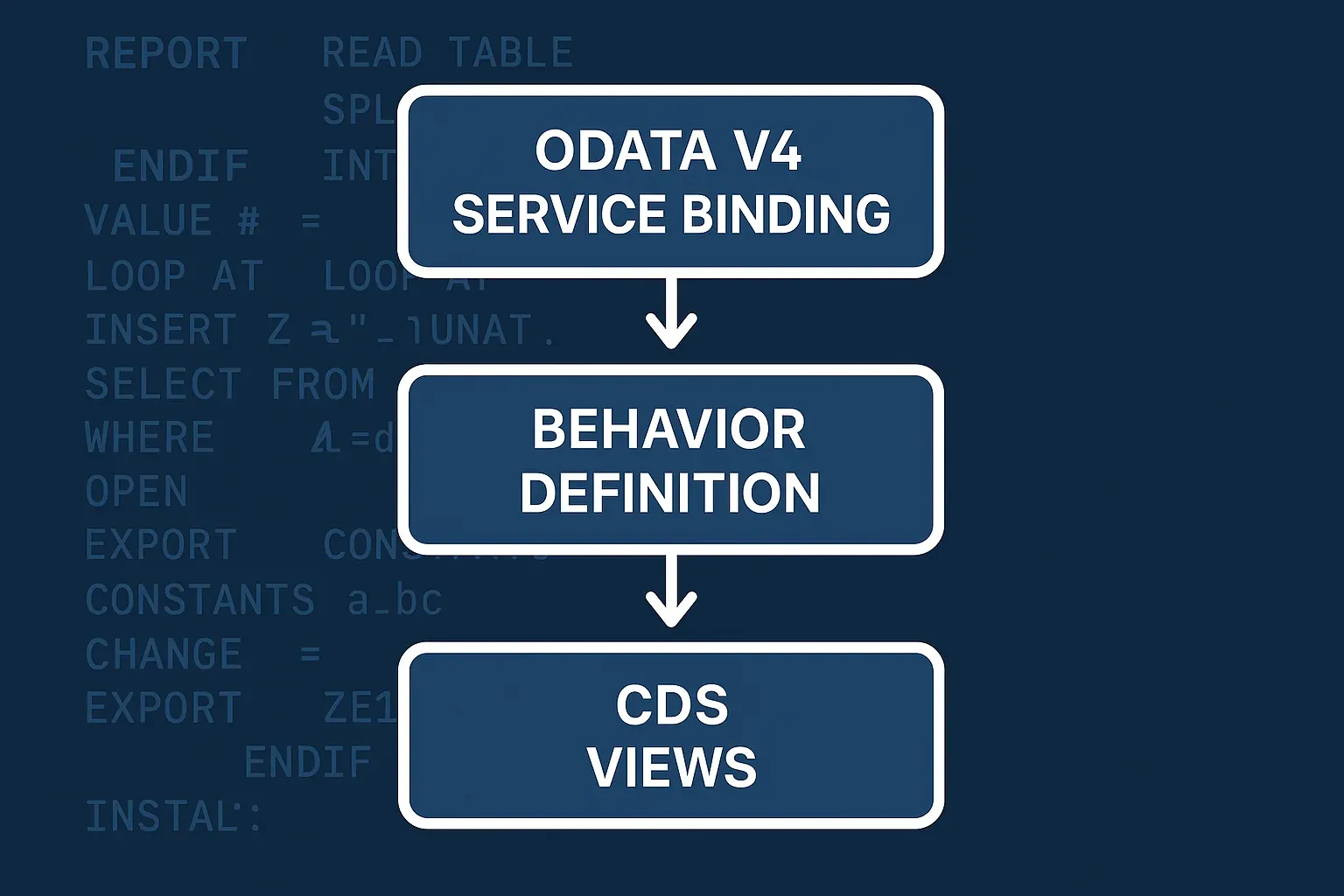
In this guide I'll walk you through the entire lifecycle: from CDS annotations and behavior definitions, through service binding, all the way to testing and deployment. I've gone through this process dozens of times on real S/4HANA projects, and I'll share the patterns that actually work — and the gotchas that will cost you hours if nobody warns you.
Why ABAP OData V4 Is a Different Beast
OData V2 in ABAP was largely about mapping SEGW-generated service classes to business logic. It worked, but it was tedious and hard to test. The RAP (ABAP RESTful Application Programming Model) stack behind OData V4 changes the game entirely.
Key differences you need to internalize:
- Batch requests are first-class citizens — V4 supports deep entity operations natively
- Server-side pagination via
$skiptokenreplaces the fragile client-side approach - Delta queries let consumers fetch only changed data
- Actions and Functions are properly typed and composable
- Everything starts from CDS — there's no SEGW, no service builder GUI as the primary entry point
The RAP model gives you two flavors: managed (the framework handles persistence) and unmanaged (you write the save sequence yourself). For most greenfield scenarios, managed is the right choice. For wrapping legacy BAPIs or complex transactional logic, you'll go unmanaged.
Step 1: Build the CDS Data Model
Everything in an ABAP OData V4 service starts with CDS views. You need at least two layers: an interface view and a consumption (projection) view.
Interface View
@AbapCatalog.sqlViewName: 'ZI_SALESORDER'
@AbapCatalog.compiler.compareFilter: true
@AccessControl.authorizationCheck: #CHECK
@EndUserText.label: 'Sales Order Interface View'
define view ZI_SalesOrder
  as select from vbak
  association [0..*] to ZI_SalesOrderItem as _Item
    on $projection.SalesOrder = _Item.SalesOrder
{
  key vbeln          as SalesOrder,
      kunnr          as SoldToParty,
      auart          as SalesOrderType,
      netwr          as NetValue,
      waerk          as TransactionCurrency,
      erdat          as CreationDate,
      /* Association */
      _Item
}
Keep the interface view clean. No UI annotations here — those belong in the projection view. This separation makes your data model reusable across multiple consumption scenarios.
Projection (Consumption) View
@EndUserText.label: 'Sales Order Projection View'
@AccessControl.authorizationCheck: #NOT_REQUIRED
@Metadata.allowExtensions: true
define root view entity ZC_SalesOrder
  provider contract transactional_query
  as projection on ZI_SalesOrder
{
  key SalesOrder,
      SoldToParty,
      SalesOrderType,
      @Semantics.amount.currencyCode: 'TransactionCurrency'
      NetValue,
      TransactionCurrency,
      CreationDate,
      /* Redirected association */
      _Item : redirected to composition child ZC_SalesOrderItem
}
Notice provider contract transactional_query — this is what tells the framework you're exposing this view via OData V4 with full transactional support. The define root view entity syntax (not the older define view) is required for RAP.
For a deeper look at CDS annotations and their semantics, check out the CDS annotations cheatsheet for real projects — it covers the annotation categories you'll use most frequently.
Step 2: Behavior Definition
The behavior definition (BDEF) is where you declare what operations your service supports. This is a concept unique to RAP and one of the things that makes V4 services so much more structured than their V2 predecessors.
managed implementation in class ZBP_SalesOrder unique;
strict ( 2 );

define behavior for ZC_SalesOrder alias SalesOrder
persistent table vbak
etag master LocalLastChangedAt
lock master
authorization master ( instance )
{
  create;
  update;
  delete;

  field ( readonly ) SalesOrder;
  field ( mandatory ) SoldToParty, SalesOrderType;

  action ( features : instance ) submitOrder result [1] $self;
  action releaseForBilling result [1] $self;

  determination setDefaults on modify { create; }
  validation checkMandatoryFields on save { create; update; }

  association _Item { create; }

  mapping for vbak corresponding
  {
    SalesOrder       = vbeln;
    SoldToParty      = kunnr;
    SalesOrderType   = auart;
    NetValue         = netwr;
    CreationDate     = erdat;
  }
}
A few things worth calling out here:
strict ( 2 )enforces the strictest RAP consistency checks — always use this for new developmentetag masterenables optimistic locking, which is critical for concurrent editing scenariosdeterminationruns logic when fields change (before save);validationruns checks at save timeaction ( features : instance )means the action's availability is determined per entity instance
Step 3: Implement the Behavior Class
With a managed scenario, the framework handles the basic CRUD operations against the database table. You only need to implement your custom logic: determinations, validations, and actions.
CLASS zbp_salesorder DEFINITION
  PUBLIC
  ABSTRACT
  FINAL
  FOR BEHAVIOR OF zc_salesorder.
ENDCLASS.

CLASS zbp_salesorder IMPLEMENTATION.
ENDCLASS.

" The actual handler class (generated via "Implement" shortcut)
CLASS lhc_salesorder DEFINITION INHERITING FROM cl_abap_behavior_handler.
  PRIVATE SECTION.
    METHODS set_defaults FOR DETERMINE ON MODIFY
      IMPORTING keys FOR salesorder~setdefaults.
    METHODS check_mandatory_fields FOR VALIDATE ON SAVE
      IMPORTING keys FOR salesorder~checkmandatoryfields.
    METHODS submit_order FOR MODIFY
      IMPORTING keys FOR ACTION salesorder~submitorder RESULT result.
ENDCLASS.

CLASS lhc_salesorder IMPLEMENTATION.
  METHOD set_defaults.
    READ ENTITIES OF zc_salesorder IN LOCAL MODE
      ENTITY salesorder
        FIELDS ( salesordertype soldtoparty )
        WITH CORRESPONDING #( keys )
      RESULT DATA(orders)
      FAILED DATA(failed).

    LOOP AT orders INTO DATA(order).
      IF order-salesordertype IS INITIAL.
        MODIFY ENTITIES OF zc_salesorder IN LOCAL MODE
          ENTITY salesorder
            UPDATE FIELDS ( salesordertype )
            WITH VALUE #( ( %tky          = order-%tky
                            salesordertype = 'TA' ) ).
      ENDIF.
    ENDLOOP.
  ENDMETHOD.

  METHOD check_mandatory_fields.
    READ ENTITIES OF zc_salesorder IN LOCAL MODE
      ENTITY salesorder
        FIELDS ( soldtoparty )
        WITH CORRESPONDING #( keys )
      RESULT DATA(orders).

    LOOP AT orders INTO DATA(order).
      IF order-soldtoparty IS INITIAL.
        APPEND VALUE #(
          %tky = order-%tky
          %state_area = 'VALIDATE_SOLDTO'
        ) TO failed-salesorder.

        APPEND VALUE #(
          %tky       = order-%tky
          %state_area = 'VALIDATE_SOLDTO'
          %msg       = new_message(
                         id       = 'ZSD_MESSAGES'
                         number   = '001'
                         severity = if_abap_behv_message=>severity-error
                         v1       = order-salesorder )
          %element-soldtoparty = if_abap_behv=>mk-on
        ) TO reported-salesorder.
      ENDIF.
    ENDLOOP.
  ENDMETHOD.

  METHOD submit_order.
    " Business logic for order submission
    READ ENTITIES OF zc_salesorder IN LOCAL MODE
      ENTITY salesorder
        ALL FIELDS
        WITH CORRESPONDING #( keys )
      RESULT DATA(orders).

    LOOP AT orders INTO DATA(order).
      " ... call FM, BAPI, or service here
      APPEND VALUE #(
        %tky   = order-%tky
        %param = order
      ) TO result.
    ENDLOOP.
  ENDMETHOD.
ENDCLASS.
The IN LOCAL MODE bypass is important inside behavior handlers — it skips authorization checks and feature controls that would otherwise apply to external calls, preventing infinite loops in your own service logic.
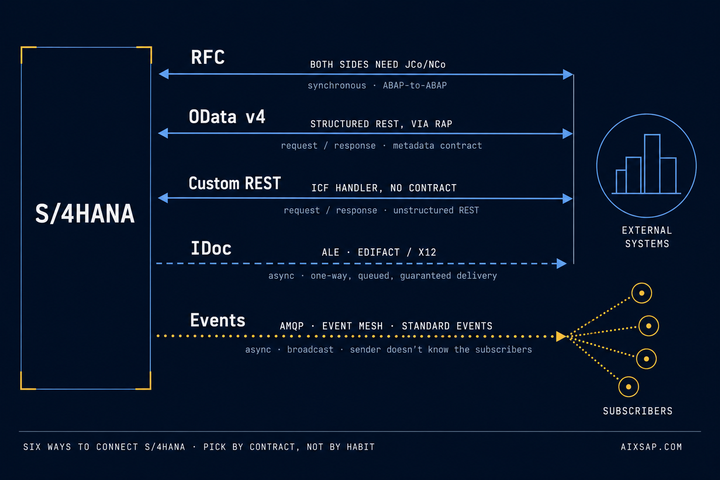
If you're integrating this service with external systems via RFC or IDoc alongside OData, the SAP integration guide covering RFC, OData, REST, and IDoc has the comparison you need to decide when each protocol is the right tool.
Step 4: Service Definition and Binding
Once your CDS views and behavior definition are in place, you need two more artifacts: a service definition and a service binding.
Service Definition
@EndUserText.label: 'Sales Order Service Definition'
define service ZSD_SALESORDER {
  expose ZC_SalesOrder as SalesOrder;
  expose ZC_SalesOrderItem as SalesOrderItem;
}
The service definition is simply a list of what you're exposing and under what alias. Keep aliases clean — they become part of your OData URL.
Service Binding
Create the service binding via ADT (right-click the service definition → New Service Binding). Choose:
- Binding Type: OData V4 - UI (for Fiori) or OData V4 - Web API (for external consumption)
- Service Name: Follow your naming convention (e.g.,
ZSD_SALESORDER_O4)
After creating the binding, click Publish. This registers the service in /IWFND/V4_ADMIN (or the equivalent for your system version). You can then test directly from the service binding editor using the built-in test client — this alone saves significant back-and-forth time compared to the old SEGW workflow.
Step 5: Metadata Extensions for Fiori Annotations
Rather than cluttering your projection view with UI annotations, use metadata extensions:
@Metadata.layer: #CORE
annotate view ZC_SalesOrder with
{
  @UI.facet: [
    { id:            'HeaderInfo',
      type:          #COLLECTION,
      label:         'Sales Order',
      position:      10 },
    { id:            'GeneralInfo',
      parentId:      'HeaderInfo',
      type:          #IDENTIFICATION_REFERENCE,
      label:         'General Information',
      position:      10 }
  ]

  @UI: { lineItem: [ { position: 10, label: 'Order' } ],
         identification: [ { position: 10 } ],
         selectionField: [ { position: 10 } ] }
  SalesOrder;

  @UI: { lineItem: [ { position: 20, label: 'Sold-To' } ],
         identification: [ { position: 20 } ],
         selectionField: [ { position: 20 } ] }
  SoldToParty;

  @UI: { lineItem: [ { position: 30, label: 'Net Value',
                        criticality: 'Criticality' } ],
         identification: [ { position: 30 } ] }
  NetValue;
}
The @Metadata.layer: #CORE means these annotations are part of the base delivery. Partners and customers can override at #PARTNER or #CUSTOMER layers without touching your code. For the full picture on how Fiori Elements consumes these annotations, the guide on CDS Fiori Elements annotations for List Report and Object Page is the companion piece you want.
Authorization and Access Control
Don't neglect DCL (Data Control Language) — your OData V4 service inherits access control from the CDS layer. Define access control objects for your interface views:
@EndUserText.label: 'Access Control for Sales Order'
@MappingRole: true
define role ZI_SalesOrder {
  grant select on ZI_SalesOrder
    where ( SalesOrderType ) =
      aspect pfcg_auth(
        ZSD_ORDER,
        AUART,
        ACTVT = '03'
      );
}
For a thorough treatment of row-level security via DCL roles, see CDS Views row-level security with DCL roles — the patterns there apply directly to V4 service security.
Testing Your OData V4 Service
The service binding editor gives you a quick sanity check, but for real testing you need more. Here's what works in practice:
Unit testing the behavior class: Use CL_ABAP_BEHV_TEST_ENVIRONMENT to isolate your handler methods from the database. This is the same pattern covered in testable ABAP architecture and unit testing — inject test doubles for your entity reads and verify that your validations fire correctly.
HTTP-level testing: Use Postman or the built-in ADT test client. Key endpoints to verify:
GET /sap/opu/odata4/sap/zsd_salesorder_o4/srvd/sap/zsd_salesorder/0001/SalesOrder— entity set readGET .../SalesOrder('0000000010')— single entity readPOST .../SalesOrderwith JSON body — createPOST .../SalesOrder('0000000010')/com.sap.gateway.srvd.zsd_salesorder.v0001.submitOrder— action call
For batch requests (essential for create-with-children scenarios), the request body uses multipart/mixed boundaries — test these explicitly, as the serialization behavior differs from V2.
Common Pitfalls and How to Avoid Them
Missing $self in action results: If your action result type is [1] $self, the framework expects you to return the full entity. Return only what was read — don't construct the entity manually or you'll get inconsistent ETags.
Forgetting to publish after changes: Changing the BDEF or projection view doesn't auto-republish the service binding. Get into the habit of republishing after any structural change.
ETag mismatches on update: If you're seeing 412 Precondition Failed errors, check that your LocalLastChangedAt field is actually being updated on every write. The framework compares the client-provided ETag against this field.
Draft handling complexity: If you need draft-enabled scenarios (save-as-draft, activate), add with draft; to your BDEF. It adds significant complexity — only use it when the UI genuinely requires it.
Performance on large entity sets: OData V4 supports server-side paging via $skiptoken automatically in RAP, but you should still verify that your underlying CDS views have proper index usage. The patterns from HANA code pushdown patterns in ABAP apply here — keep filtering logic inside CDS, not in behavior class methods.
Deployment Checklist
Before transporting to production, run through this list:
- All objects included in a single transport request in dependency order (CDS views → BDEF → behavior class → service definition → service binding)
- Access control objects activated and tested in QA
- Service binding published in each target system (publish is system-specific, not transported)
- Business catalog entries created and assigned to business roles
- ETag behavior verified under concurrent edit conditions
- $metadata document reviewed — alias names and navigation property names match frontend expectations
The publish step catches people every time. The service binding artifact is transported, but the activation state is not — you must publish manually in each system after the transport lands, or the service won't be reachable.
Wrapping Up
Building a production-grade ABAP OData V4 service with RAP is genuinely more structured and maintainable than the old SEGW approach once you understand the moving parts. The CDS-first model, explicit behavior definitions, and built-in test infrastructure make the whole thing more testable and less prone to the runtime surprises that plagued V2 services.
The learning curve is real — mostly around understanding how determinations, validations, and the transactional buffer interact — but once that mental model clicks, you'll move fast. Start with a managed scenario, get comfortable with the lifecycle, then tackle unmanaged when your use case demands it.
Further Reading
To manage and expose your OData APIs at scale, see SAP BTP Integration Suite Deep Dive: Building Enterprise-Grade, API-Led Connectivity.