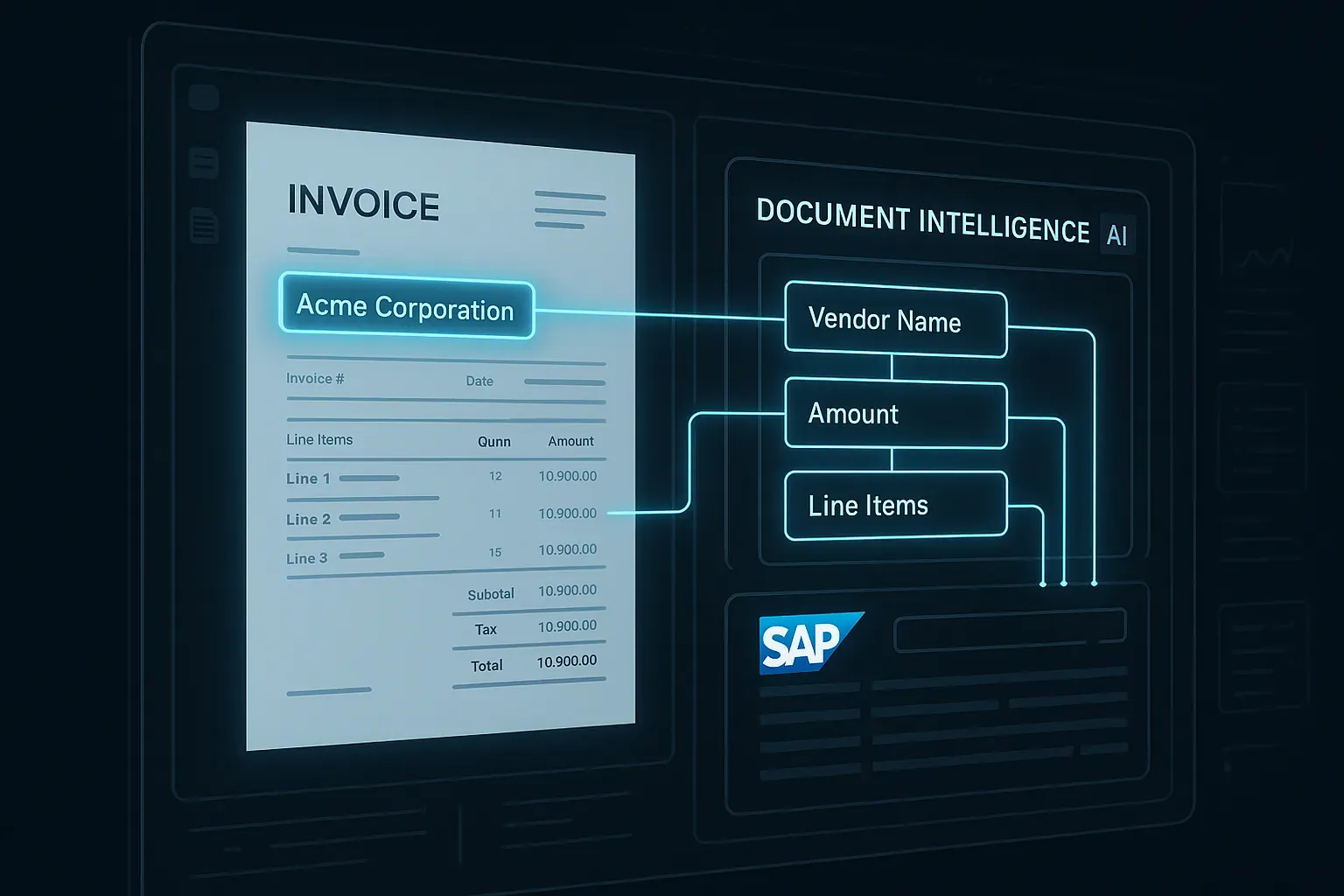
AI invoice extraction in SAP is no longer a futuristic concept — it's something you can build today with LLM vision models and a bit of ABAP glue code. If you've ever watched an AP clerk manually key in vendor invoices line by line, you already know the pain. In this post, I'll walk you through a practical architecture for extracting structured data from invoice images and PDFs using vision-capable LLMs, and then posting that data cleanly into SAP.
This isn't a vendor pitch for any specific SAP product. This is how you actually build it — with real code, real tradeoffs, and lessons learned from production rollouts.
Why AI Invoice Extraction in SAP Makes Sense Now
Traditional OCR tools have been around for decades, but they break the moment a vendor changes their invoice layout. You'd maintain template libraries, fiddle with coordinate mappings, and still end up with exception queues full of misread amounts. Vision-capable LLMs — GPT-4o, Claude 3.5 Sonnet, Gemini 1.5 Pro — change this fundamentally. They understand context, not just pixel positions.
What you get with an LLM vision approach:
- Zero-template extraction — handles any invoice layout automatically
- Structured JSON output you can map directly to SAP fields
- Confidence reasoning — the model tells you when it's uncertain
- Multi-language invoice support out of the box
The tradeoff is cost per document and latency. You need to architect around both. Let's get into it.
Architecture Overview: From PDF to SAP Posting
Here's the high-level flow I've used in production environments:
Invoice (PDF/Image)
       ↓
  Preprocessing (base64 encode, page splitting)
       ↓
  LLM Vision API call (GPT-4o or Claude)
       ↓
  JSON extraction + validation
       ↓
  ABAP mapping layer
       ↓
  SAP FI posting (BAPI_ACC_DOCUMENT_POST or FB60)
The beauty of this architecture is that the LLM layer is completely decoupled from SAP. You can host the extraction logic as a lightweight Python service, or call the API directly from ABAP using HTTP client calls — the same technique described in detail in our OpenAI API ABAP authentication and streaming guide.
The Extraction Prompt: This Is Where It Lives or Dies
Getting clean structured output from an LLM vision model depends almost entirely on your system prompt. Here's a battle-tested prompt pattern:
SYSTEM_PROMPT = """
You are a document intelligence assistant specialized in invoice data extraction.
Analyze the provided invoice image and extract ALL of the following fields.
Return ONLY valid JSON matching the schema below. If a field is not present, use null.
Do not add any explanation or text outside the JSON.

Required schema:
{
  "vendor_name": "string",
  "vendor_address": "string",
  "invoice_number": "string",
  "invoice_date": "YYYY-MM-DD",
  "due_date": "YYYY-MM-DD or null",
  "currency": "ISO 4217 code",
  "subtotal": number,
  "tax_amount": number,
  "total_amount": number,
  "line_items": [
    {
      "description": "string",
      "quantity": number,
      "unit_price": number,
      "line_total": number,
      "tax_code": "string or null"
    }
  ],
  "payment_terms": "string or null",
  "purchase_order_number": "string or null",
  "confidence_score": number between 0 and 1
}
"""
Three things to notice here: First, I'm specifying date formats explicitly — LLMs will otherwise return dates in whatever format appears on the document. Second, I'm asking for a confidence_score. This becomes your routing logic: high confidence invoices go straight to posting, low confidence ones go to human review. Third, I'm asking for null on missing fields, not empty strings. This matters when you're doing downstream type validation.
Python Extraction Service
Here's a minimal but production-ready extraction function using the OpenAI API:
import base64
import json
import re
from pathlib import Path
from openai import OpenAI
from pdf2image import convert_from_bytes

client = OpenAI()  # uses OPENAI_API_KEY env var

def pdf_to_base64_images(pdf_bytes: bytes) -> list[str]:
    """Convert PDF pages to base64-encoded PNG images."""
    images = convert_from_bytes(pdf_bytes, dpi=200)
    encoded = []
    for img in images:
        import io
        buffer = io.BytesIO()
        img.save(buffer, format="PNG")
        encoded.append(base64.b64encode(buffer.getvalue()).decode("utf-8"))
    return encoded

def extract_invoice_data(pdf_bytes: bytes) -> dict:
    """Extract structured invoice data from a PDF using GPT-4o vision."""
    pages = pdf_to_base64_images(pdf_bytes)

    # For multi-page invoices, use the first 3 pages max
    # Most invoice data lives on page 1, but line items can span pages
    content = []
    for i, page_b64 in enumerate(pages[:3]):
        content.append({
            "type": "image_url",
            "image_url": {
                "url": f"data:image/png;base64,{page_b64}",
                "detail": "high"  # use 'high' for invoices — detail matters
            }
        })

    content.append({
        "type": "text",
        "text": "Extract all invoice data from these pages according to the schema."
    })

    response = client.chat.completions.create(
        model="gpt-4o",
        messages=[
            {"role": "system", "content": SYSTEM_PROMPT},
            {"role": "user", "content": content}
        ],
        max_tokens=2000,
        temperature=0  # deterministic output for data extraction
    )

    raw_text = response.choices[0].message.content

    # Strip markdown code blocks if present
    raw_text = re.sub(r"```json\
?", "", raw_text)
    raw_text = re.sub(r"```\
?", "", raw_text)

    return json.loads(raw_text.strip())
A few things I want to flag from hard experience: Set temperature=0 for extraction tasks — you want deterministic behavior, not creativity. Use detail: "high" for invoice images; the cost difference is small and the accuracy improvement on small text and numbers is significant. Always strip markdown code blocks from the response — even with explicit instructions, models sometimes wrap JSON in triple backticks.
Validation Layer: Don't Trust the LLM Blindly
Before anything goes near SAP, you validate. Here's a lightweight Pydantic model that enforces your business rules:
from pydantic import BaseModel, validator, Field
from typing import Optional
from datetime import date
from decimal import Decimal

class InvoiceLineItem(BaseModel):
    description: str
    quantity: Decimal
    unit_price: Decimal
    line_total: Decimal
    tax_code: Optional[str] = None

class ExtractedInvoice(BaseModel):
    vendor_name: str
    vendor_address: Optional[str] = None
    invoice_number: str
    invoice_date: date
    due_date: Optional[date] = None
    currency: str = Field(min_length=3, max_length=3)
    subtotal: Decimal
    tax_amount: Decimal
    total_amount: Decimal
    line_items: list[InvoiceLineItem]
    payment_terms: Optional[str] = None
    purchase_order_number: Optional[str] = None
    confidence_score: float = Field(ge=0.0, le=1.0)

    @validator("total_amount")
    def total_must_balance(cls, v, values):
        if "subtotal" in values and "tax_amount" in values:
            expected = values["subtotal"] + values["tax_amount"]
            # Allow 1 cent rounding tolerance
            if abs(v - expected) > Decimal("0.01"):
                raise ValueError(
                    f"Total {v} doesn't match subtotal + tax {expected}"
                )
        return v
The balance check at the bottom is critical. A confident-sounding LLM can still hallucinate numbers that don't add up. Catching this before SAP posting saves you a lot of pain in reconciliation later.
ABAP Side: Receiving and Posting the Extracted Data
Your Python service exposes a REST endpoint. On the ABAP side, you call it with CL_HTTP_CLIENT, parse the JSON response, and map it to your posting BAPI. Here's the core mapping logic:
METHOD post_invoice_from_extraction.
  DATA: ls_headerdata  TYPE bapiache09,
        lt_accountgl   TYPE TABLE OF bapiacgl09,
        lt_accounttax  TYPE TABLE OF bapiactx09,
        lt_currencyamt TYPE TABLE OF bapiaccr09,
        lv_obj_key     TYPE bapibkpf-awkey.

  " Map header data from extracted invoice JSON
  ls_headerdata-bus_act    = 'RFBU'.
  ls_headerdata-username   = sy-uname.
  ls_headerdata-header_txt = |Invoice { iv_invoice_number }|.
  ls_headerdata-comp_code  = iv_company_code.
  ls_headerdata-doc_date   = iv_invoice_date.   " from extraction
  ls_headerdata-pstng_date = sy-datum.
  ls_headerdata-doc_type   = 'KR'.              " vendor invoice
  ls_headerdata-ref_doc_no = iv_invoice_number.

  " Vendor line (credit)
  DATA(ls_vendor_line) = VALUE bapiacap09(
    itemno_acc = 1
    vendor_no  = iv_vendor_number   " looked up from vendor master
    gl_account = '0000160000'
  ).

  " Currency amount for vendor line
  APPEND VALUE #(
    itemno_acc = 1
    currency   = iv_currency
    amt_doccur = iv_total_amount * -1  " credit
  ) TO lt_currencyamt.

  " Expense lines from line items
  DATA(lv_item) = 1.
  LOOP AT it_line_items INTO DATA(ls_item).
    lv_item += 1.
    APPEND VALUE bapiacgl09(
      itemno_acc  = lv_item
      gl_account  = determine_gl_account( ls_item-description )
      item_text   = ls_item-description(50)
    ) TO lt_accountgl.
    APPEND VALUE bapiaccr09(
      itemno_acc = lv_item
      currency   = iv_currency
      amt_doccur = ls_item-line_total
    ) TO lt_currencyamt.
  ENDLOOP.

  CALL FUNCTION 'BAPI_ACC_DOCUMENT_POST'
    EXPORTING
      documentheader = ls_headerdata
    IMPORTING
      obj_key        = lv_obj_key
    TABLES
      accountgl      = lt_accountgl
      accounttax     = lt_accounttax
      currencyamount = lt_currencyamt.

  IF lv_obj_key IS NOT INITIAL.
    CALL FUNCTION 'BAPI_TRANSACTION_COMMIT'
      EXPORTING wait = 'X'.
    rv_doc_number = lv_obj_key.
  ELSE.
    " Handle errors — collect RETURN table messages
    CALL FUNCTION 'BAPI_TRANSACTION_ROLLBACK'.
    RAISE EXCEPTION TYPE zcx_invoice_posting_failed.
  ENDIF.
ENDMETHOD.
Notice the determine_gl_account call — this is where your business logic lives. You can implement this as an AI classification step (another LLM call based on the line item description), or as a rules-based lookup table maintained by your finance team. In most projects I've done, a hybrid works best: rules first, AI fallback for unknowns. This connects nicely to the pattern we covered in AI anomaly detection for SAP transactional data — the idea of layering AI judgment on top of deterministic rules rather than replacing them.
Routing by Confidence Score
This is the piece most implementations skip, and it's where you actually achieve straight-through processing at scale. Create a simple routing table:
| Confidence Score | Action |
|---|---|
| ≥ 0.92 | Auto-post to SAP, no human review |
| 0.75 – 0.91 | Post to SAP as parked document, notify AP for review |
| < 0.75 | Flag for manual extraction, send to exception queue |
In a typical rollout, you'll see 60-70% of invoices hit the auto-post threshold after a few weeks of tuning. The remaining 30-40% benefit from a human glance before posting. You're not eliminating AP clerks — you're redirecting their time to exceptions that actually need judgment.
Vendor Master Matching
One practical challenge: the LLM extracts a vendor name like "Siemens AG München" but your SAP vendor master has it as "Siemens AG" under vendor number 100045. You need a fuzzy matching step.
A simple approach that works well:
from rapidfuzz import process, fuzz

def match_vendor(extracted_name: str, vendor_master: dict[str, str]) -> tuple[str, float]:
    """
    vendor_master: {vendor_number: vendor_name}
    Returns: (vendor_number, confidence)
    """
    names = list(vendor_master.values())
    numbers = list(vendor_master.keys())

    match, score, idx = process.extractOne(
        extracted_name,
        names,
        scorer=fuzz.token_sort_ratio
    )

    vendor_number = numbers[idx]
    confidence = score / 100.0

    return vendor_number, confidence
Combine this confidence score with the extraction confidence score for your overall routing decision. A high-confidence extraction from an unrecognized vendor should still go to human review.
Handling Edge Cases You'll Actually Encounter
A few gotchas from real deployments:
Credit notes: Train your prompt to detect credit notes explicitly. Add a document_type field to your schema with values "INVOICE" or "CREDIT_NOTE". The LLM handles this well if you ask for it explicitly.
Multi-currency invoices: Some invoices show amounts in two currencies. Specify in your prompt: "Extract the invoice currency and all amounts in that currency only. Ignore any reference currency conversions."
Handwritten or stamped content: Vision models handle printed text excellently but struggle with handwritten amounts or rubber stamp overlays. Add a post-processing check: if extracted line item totals don't sum to the subtotal within tolerance, downgrade confidence regardless of what the model reported.
Scanned PDFs vs native PDFs: For native (digital) PDFs, you can extract text directly with PyMuPDF before hitting the vision API — it's faster and cheaper. Only use vision for scanned/image-based documents. Build this detection into your preprocessing layer.
Connecting to the Broader AI in SAP Picture
Invoice extraction is one of the cleaner AI use cases in SAP — the input is bounded, the output schema is well-defined, and success is measurable. It's a good entry point if you're building the case for AI investment in your SAP environment. Once you have the extraction pipeline running, you can extend it with anomaly detection on the extracted amounts (flagging invoices that look statistically unusual vs. historical patterns for that vendor). We covered exactly that kind of pattern in our post on AI anomaly detection on SAP transactional data.
For teams building more complex AI pipelines where you need to query SAP documentation or vendor catalogs as part of the extraction process, the retrieval-augmented approach in our RAG pipeline for SAP documentation with open source LLMs post is worth a read. And if you need a solid foundation for making authenticated API calls from ABAP — which you'll need for any of this — start with OpenAI API integration with ABAP.
What to Measure in Production
Set up these KPIs from day one:
- Straight-through processing rate — invoices auto-posted without human touch
- Field accuracy rate — sampled comparison of extracted values vs. ground truth
- Exception rate by vendor — identifies vendors with unusual invoice formats worth special handling
- Cost per document — LLM API costs per invoice processed (typically $0.01–0.05 per invoice with GPT-4o)
- Processing latency — end-to-end time from PDF receipt to SAP document number
Final Thoughts
AI invoice extraction in SAP with LLM vision models is genuinely production-ready technology today. The architecture isn't complicated — the real work is in the validation layer, vendor matching, and confidence-based routing. Get those right and you'll achieve straight-through processing rates that make the cost per document trivially small compared to the labor savings.
Start with a pilot on a single invoice type from your highest-volume vendor. Measure field accuracy on 100 documents before you go live. Build your confidence thresholds conservatively and relax them as you gain data. That's the path to production.
This article is part of the SAP AI integration & architecture hub — patterns, use cases, and guardrails for AI in SAP systems.