Why This Decision Still Trips Up Experienced Developers
If you've spent any meaningful time in SAP development, you've almost certainly stared at a requirements document and asked yourself: should I use a BAdI, an Enhancement Spot, or a classic User Exit for this? The ABAP BAdI enhancement landscape is surprisingly nuanced, and making the wrong call here has real consequences — upgrade complexity, performance problems, or simply code that your successor will curse you for. I've seen all three outcomes firsthand, and I want to give you a decision framework that actually works in production environments, not just in theory.
Let's cut through the noise and build a clear mental model together.
A Quick History Lesson (Bear With Me — It Matters)
SAP's extensibility story evolved in layers, and understanding that timeline explains why all three mechanisms still coexist today:
- User Exits (pre-4.6C era): FORM routines inside SAP's source code, mostly in SD, MM, and FI. Think
USEREXIT_SAVE_DOCUMENTor the classic MV45AFZZ includes. Hard-coded, single implementation, no interface contract. - BAdIs (Business Add-Ins, introduced in 4.6C): Object-oriented, multiple implementations, filter-based selection. A massive leap forward in design.
- Enhancement Framework / Enhancement Spots (introduced in ECC 6.0): A meta-layer that wraps everything — explicit enhancements, implicit enhancements, BAdi definitions, and more — into a coherent concept managed through SMOD/CMOD's spiritual successor: transaction SE18/SE19 and the Enhancement Framework.
The important thing to internalize: these aren't competing technologies so much as an evolutionary stack. In modern SAP S/4HANA development, you'll still encounter all three, sometimes in the same codebase.
Understanding the Core Mechanisms
Classic User Exits: The Legacy You Can't Ignore
User Exits are FORM routines that SAP deliberately left empty (or partially implemented) inside standard programs. They exist inside program includes with names like MV45AFZZ, ZXM06U02, or customer-include sections. You implement them by adding code directly inside those includes.
" Classic User Exit - FORM routine in MV45AFZZ
FORM USEREXIT_SAVE_DOCUMENT.
  " Your custom logic runs here
  " Only ONE implementation possible
  IF vbak-auart = 'ZOR'.
    PERFORM z_validate_custom_order.
  ENDIF.
ENDFORM.
The brutal truth about User Exits: They work. They're simple. But they have two fatal flaws: you can only have one implementation per exit (so multiple projects stepping on each other is a nightmare), and they're tightly coupled to the standard program's structure. Upgrades can — and do — break them silently.
Use them today only when: the standard code offers no BAdI alternative, you're maintaining a legacy system that isn't going to S/4HANA anytime soon, and the requirement is simple enough that a single implementation is genuinely sufficient.
BAdIs: The Object-Oriented Upgrade Path
A BAdI (Business Add-In) is SAP's OOP answer to the User Exit problem. SAP defines an interface and an enhancement spot in standard code; you create an implementation class that implements that interface. Multiple implementations can coexist, filter-based activation is possible, and the whole thing is transport-friendly.
Here's what working with a modern BAdI looks like in practice:
" Step 1: Find the BAdI definition (SE18)
" BAdI Name: BADI_SD_SALES_ORDER
" Interface: IF_EX_BADI_SD_SALES_ORDER

" Step 2: Create your implementation class
CLASS zcl_badi_sd_sales_order_impl DEFINITION
  PUBLIC
  FINAL
  CREATE PUBLIC.

  PUBLIC SECTION.
    INTERFACES if_ex_badi_sd_sales_order.
ENDCLASS.

CLASS zcl_badi_sd_sales_order_impl IMPLEMENTATION.

  METHOD if_ex_badi_sd_sales_order~check_order_validity.
    " Your business logic here
    " You get strongly-typed parameters from the interface
    IF is_header-doc_type = 'ZOR'.
      " Custom validation
      ev_valid = abap_true.
    ENDIF.
  ENDMETHOD.

ENDCLASS.
There are two generations of BAdIs you need to know about:
- Classic BAdIs (pre-ECC 6.0): Managed via SE18/SE19 with the older adapter class pattern. You'll see these with
CL_EXITHANDLERandGET_INSTANCEcalls in SAP standard code. - Kernel BAdIs (new-style, ECC 6.0+): Part of the Enhancement Framework. Cleaner definition, better filter support, and they're what SAP uses in all modern S/4HANA code.
When you find a BAdI available for your requirement, use it. It's SAP's intended extension point, it's documented, and it's upgrade-stable by design.
Enhancement Spots: The Framework That Contains Everything
This is where many developers get confused. An Enhancement Spot is not a replacement for BAdIs — it's the container concept that the Enhancement Framework uses to group extension points together. When you look at a program in SE80 and navigate to its enhancement spots, you're seeing the organized collection of all intentional extension points SAP has defined for that program.
Within Enhancement Spots, you'll find two flavors of enhancements:
Explicit Enhancements: SAP has deliberately added an enhancement point or enhancement section to the code. These are your safest bet for source code modifications.
" SAP Standard code (simplified)
DATA: lv_result TYPE string.

" SAP placed an explicit enhancement point here
ENHANCEMENT-POINT my_enh_spot_1
  SPOTS es_my_program
  STATIC.

lv_result = 'standard'.
You create an enhancement implementation that injects code at that point:
" Your enhancement implementation
ENHANCEMENT 1 z_my_enhancement_impl.
  " Code inserted at the enhancement point
  PERFORM z_my_custom_logic.
ENHANCEMENT.
Implicit Enhancements: The Enhancement Framework automatically provides implicit enhancement options at the start and end of every function module, method, form routine, and program. These are dangerous territory — they're not documented, they're not contractually stable, and they're your last resort.
" Implicit enhancement at start of a FORM routine
" (Added via right-click > Enhancement Operations in SE38)
" Use sparingly - this is "anywhere in the code" territory
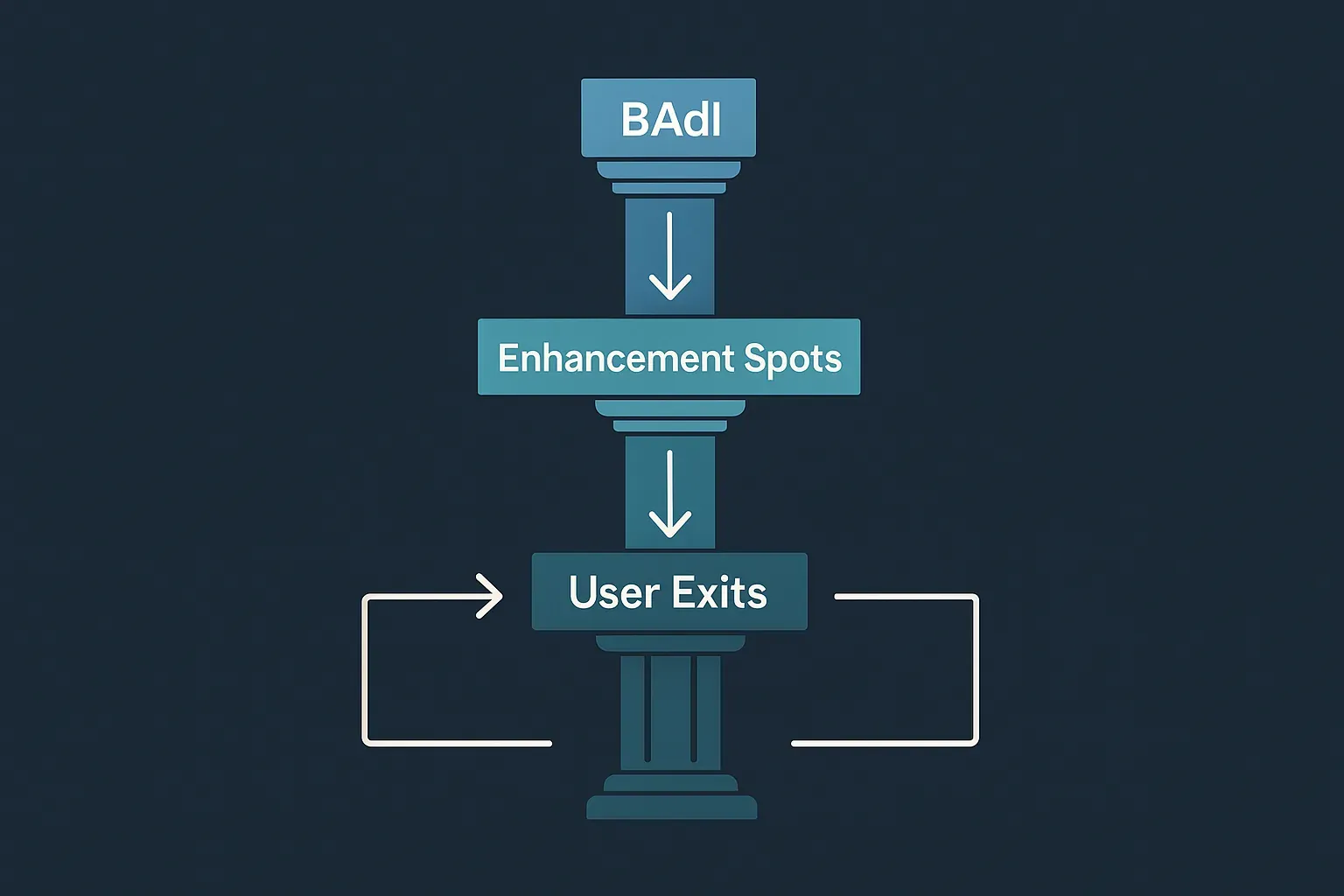
The Decision Framework: A Practical Flow
When you face an extension requirement, walk through this hierarchy. Every step down the list represents increasing risk and maintenance burden.
Level 1: Is There a BAdI for This?
Always start here. Search SE18 with a wildcard, check SAP's documentation, and look at the Enhancement Spot for the relevant package in SE80. If a kernel BAdI exists that covers your requirement, use it and stop here. This is the path SAP intended, it's upgrade-safe, and it supports multiple parallel implementations — critical in large landscapes where multiple projects run simultaneously.
Practical tip: Don't just search by name. Use transaction SE18, filter by the relevant application component (like SD or MM), and browse. You'll often find BAdIs you didn't know existed.
Level 2: Is There an Explicit Enhancement Point?
If no BAdI covers your requirement, check for an explicit enhancement point inside the Enhancement Spot. These are SAP's acknowledgment that the code might need customization here even without a full interface contract. They're reasonably stable across upgrades.
In SE80, navigate to the program → right-click → Enhancement Operations → Show Implicit Enhancement Options. If you see an explicit one near your target code location, use it.
Level 3: Is There a Compatible User Exit?
Still no luck? Check transaction SMOD for available user exits in the relevant application area. Classic User Exits in SD, MM, and FI are well-documented and have been stable for decades. If your requirement fits cleanly into one, they're actually a pragmatic choice — especially in non-S/4HANA systems.
The critical constraint to verify: will you be the only project implementing this exit? If multiple development streams share the same system, User Exits become coordination nightmares.
Level 4: Implicit Enhancement — With Eyes Wide Open
This is the break-glass option. Implicit enhancements let you inject code essentially anywhere. They will survive transport, but they carry real risks:
- No interface contract — SAP can refactor the surrounding code
- Invisible during code reviews unless you specifically look for them
- Stack unpredictably with other implicit enhancements from different projects
If you use an implicit enhancement, document it aggressively — in the code, in the transport description, and in your team's knowledge base. Your future self will thank you.
The S/4HANA Factor: How Cloud Changes the Picture
If you're architecting for SAP S/4HANA Cloud (public edition), the entire landscape shifts dramatically. Classic User Exits are gone. Implicit Enhancements are gone. You work exclusively with released BAdIs (check the C1 release contract in SE18) and the ABAP RESTful Application Programming Model. This constraint is actually a gift — it forces clean extension design. For S/4HANA on-premise, you technically still have access to the full stack, but SAP's guidance is clear: use only released APIs and BAdIs if you ever want to move to the cloud edition. Starting that discipline now saves painful migration work later. This connects directly to the broader patterns discussed in the ABAP RAP Deep Dive on Business Logic Validations — the RAP model itself is designed around clean, BAdI-style extension patterns.
Testing Your Extension Choice
One aspect that rarely gets discussed in the BAdI vs Enhancement debate is testability. This matters enormously for long-term quality.
BAdI implementations — because they're proper ABAP classes implementing interfaces — are directly unit-testable. You can inject test doubles, mock the BAdI interface, and write proper isolation tests. If you're following the testing approaches covered in articles like the Senior Architect's Guide to Test Doubles and Mocking or the ABAP Unit Testing Mastery series, BAdI implementations slot naturally into that discipline.
Classic User Exits and implicit enhancements are FORM routines or code fragments — harder to unit test in isolation, tightly coupled to program state. Factor this into your decision when quality and testability are non-negotiable requirements.
A Real-World Scenario Walkthrough
Let me walk through a concrete example. Suppose you need to add custom partner determination logic in SD sales order processing.
Step 1 — BAdI search: SE18 search for *PARTNER*SD* reveals BADI_SD_PARTNER_DETERMINATION. It exists, it's a kernel BAdI, and it covers the use case. Decision: use the BAdI. Create ZCL_BADI_SD_PARTNER_IMPL, implement the interface, activate.
Now a different scenario: you need to add a custom check after a specific internal FORM routine in a pricing program, but no BAdI exists near that logic.
Step 1 — BAdI search: Nothing relevant found.
Step 2 — Explicit enhancement check: SE80 review shows no explicit enhancement point at the relevant location.
Step 3 — User Exit check: SMOD shows no matching exit in the pricing area.
Step 4 — Implicit enhancement: You add an implicit enhancement at the end of the FORM routine. You document it thoroughly, add a comment block explaining the business reason, and raise a message to your team that this enhancement exists.
Notice the process: you didn't jump straight to the implicit enhancement. You exhausted the safer options first. That discipline is what separates maintainable systems from upgrade nightmares.
Quick Reference Decision Table
| Mechanism | OO Support | Multiple Implementations | Upgrade Safety | Testability | Use When |
|---|---|---|---|---|---|
| Kernel BAdI | ✅ | ✅ | High | Excellent | First choice, always |
| Classic BAdI | ✅ | ✅ | High | Good | Legacy systems, no kernel BAdI available |
| Explicit Enhancement | ❌ | ✅ | Medium | Limited | No BAdI, SAP provided explicit point |
| User Exit | ❌ | ❌ | Medium | Limited | Legacy, well-documented, single team |
| Implicit Enhancement | ❌ | ✅ | Low | Poor | Last resort only |
Connecting This to Modern Architecture Principles
The extension mechanism you choose should reflect the same principles that guide your OOP design. The Strategy and Template Method patterns we apply in custom code have direct analogies here: BAdIs are essentially the Strategy pattern baked into the SAP platform. You're swapping implementations behind a stable interface. When you reach for an implicit enhancement instead, you're essentially abandoning that principle — injecting code without a contract.
Similarly, robust exception handling in your BAdI implementations matters. The patterns discussed in ABAP Class-Based Exceptions apply directly to BAdI implementation classes, which are full ABAP OO citizens and should be written accordingly.
Conclusion: Discipline Over Convenience
The ABAP BAdI enhancement framework exists for a reason — it's SAP's contractual promise that your extension point will survive upgrades. Every time you skip it in favor of an implicit enhancement or a User Exit when a BAdI was available, you're trading short-term convenience for long-term risk. That risk lands on whoever maintains the system during the next major release.
The decision framework isn't complicated: BAdI first, explicit enhancements second, User Exits third, implicit enhancements as a documented last resort. Follow that hierarchy consistently and your custom code will be something future developers appreciate rather than dread.
What's the trickiest extension decision you've faced in a real project? Drop it in the comments — I'd genuinely love to hear how you navigated it.